UI/UX DESIGN
COURSE IN HYDERABAD
Become a Job-Ready UI/UX & Product Designer
Master end-to-end product design, craft enterprise-grade Figma design systems, conduct real user research, and build portfolio-ready case studies with career & placement assistance from AIDEAS Academy.
Get the complete syllabus + batch details + fee information
Our Alumini Work At



















Why Learn UI/UX Design in 2026?
Don't Learn Just Figma Tools. Learn How to Build Complete Digital Products.
Knowing basic design tools is only the beginning.
Companies need product designers who can work across the entire UX lifecycle from user research and wireframing to scalable Figma design systems, usability validation, and modern AI design integrations.
Our UI/UX Design program takes you from fundamentals to crafting real, portfolio-ready product experiences that hiring managers look for.
Figma + Design systems + User research + Prototyping + Usability testing + AI design tools.
Industry Standard Tools & Technologies

Figma & Auto Layout
Master modern component architecture, auto layout 5.0, and constraints.

Design Systems
Build atomic component libraries, variants, and multi-theme design tokens.

User Research & Personas
Conduct user interviews, empathy mapping, and user journey mapping.

Wireframing & IA
Structure intuitive information architecture and low-to-high fidelity wireframes.
Interactive Prototyping
Create realistic micro-interactions, smart animations, and interactive flows.

Usability Testing
Evaluate task completion, A/B test patterns, and iterate on user feedback.

Design Handoff & Collab
Inspect designs, export tokens, and collaborate with developers in Jira.

AI in Product Design
Accelerate user research, UX copywriting, and moodboarding with AI tools.
Want to See the Complete Roadmap?
Get the UI/UX Design Syllabus & Class Schedule
Master UI/UX Design from Scratch
- Introduction to UI & UX Design ecosystem
- Visual Hierarchy & Gestalt Principles
- Color Theory, Contrast Ratios & Psychology
- Typography Scale, Pairing & Readability
- Grid Systems, Layouts & Spatial Composition
- Design Thinking Process: 5-Stage Framework
- Qualitative & Quantitative UX Research
- User Interviews & Stakeholder Mapping
- User Personas & Empathy Mapping
- Customer Journey Mapping (CJM)
- Information Architecture (IA) & Card Sorting
- User Flow & Task Flow Optimization
- Rapid Paper Sketching & Ideation
- Low-Fidelity Wireframes in FigJam
- Mid-to-High Fidelity Digital Wireframes
- Common Web & Mobile UX Patterns
- Heuristic Evaluation & Usability Principles
- Figma Interface, Canvas & Shortcuts
- Frames, Groups & Responsive Constraints
- Auto Layout 5.0: Wrap, Min/Max & Padding
- Styles: Color, Typography & Elevation Effects
- Figma Plugins, Widgets & Community Libraries
- Atomic Design Methodology (Atoms to Pages)
- Reusable Master Components & Variants
- Figma Component Properties: Boolean, Text, Swap
- Design Variables & Tokens: Light/Dark Modes
- Building a Scalable Cross-Platform UI Kit
- Clickable Prototypes & Transition Curves
- Smart Animate & Interactive Components
- Scroll Animations, Parallax & Sticky Headers
- Microinteractions: Button States, Loaders & Toggles
- Mobile Device Mockup Previews (Figma Mirror)
- Setting Up Moderated & Unmoderated Tests
- A/B Testing Frameworks & Usability Metrics
- Heatmaps & Click Tracking Analysis
- Identifying Usability Friction & Drop-offs
- Iterating Designs Based on Test Findings
- Apple iOS Human Interface Guidelines (HIG)
- Google Material Design 3 (Material You)
- Responsive Desktop, Tablet & Mobile Breakpoints
- Touch Targets, Thumb Zones & Accessibility (WCAG)
- Adaptive vs Responsive Layout Strategies
- Figma Dev Mode & Code Inspection
- Design Token Export & Asset Optimization
- Writing Clear Developer Specifications
- Leveraging AI Tools: ChatGPT for UX Copy & Relume
- Collaborating with Engineering Teams in Jira
- Structuring 3 In-Depth Case Studies
- Publishing on Behance, Dribbble & Notion
- Whiteboard Design Challenge Strategies
- Portfolio Presentation & Storytelling
- 1:1 Mock Interviews & Placement Referrals
Don't Just Watch Classes. Design Real Products.
Build Projects That You Can Actually Show in an Interview.
Your design portfolio should demonstrate what you can solve — not just pretty visuals.
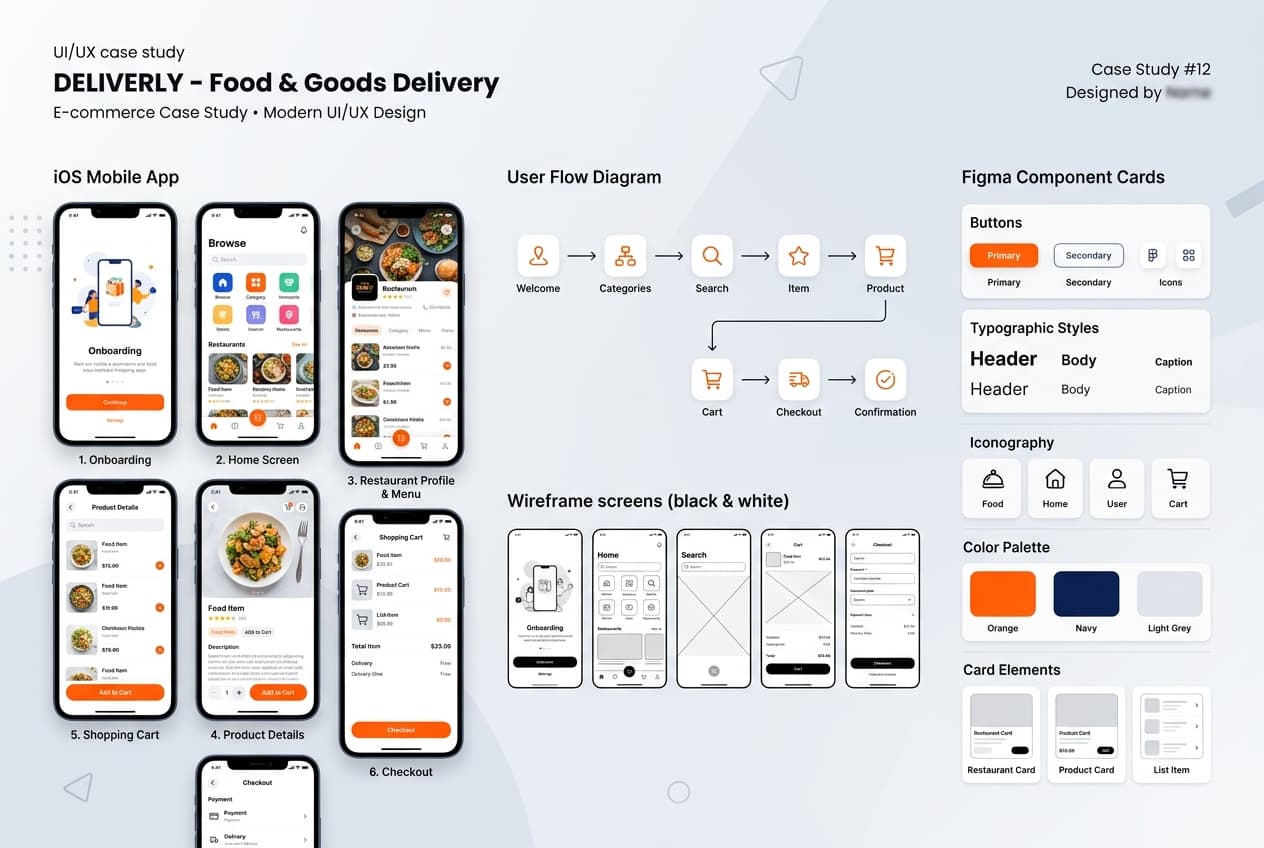
Deliverly — Food & Quick Commerce App
End-to-end mobile UX case study featuring user research, empathy mapping, interactive checkout flows, and Figma component libraries.
- User research interviews, empathy maps & checkout drop-off analysis
- Low-fidelity FigJam wireframes to high-fidelity iOS screen flows
- Reusable atomic components: search bar, product cards, bottom nav
- Usability testing validation with 38% task completion improvement
Nexus — Neo-Bank & Investment App
Mobile banking and portfolio management UX with dual light/dark modes, interactive financial charts, and biometric auth flows.
- Real-time stock & portfolio performance charts with interactive scrubbers
- 1-tap instant transfer modal flows with biometric security states
- Comprehensive Figma design system with multi-theme design tokens
- Strict WCAG 2.1 AA accessibility contrast compliance across dark mode
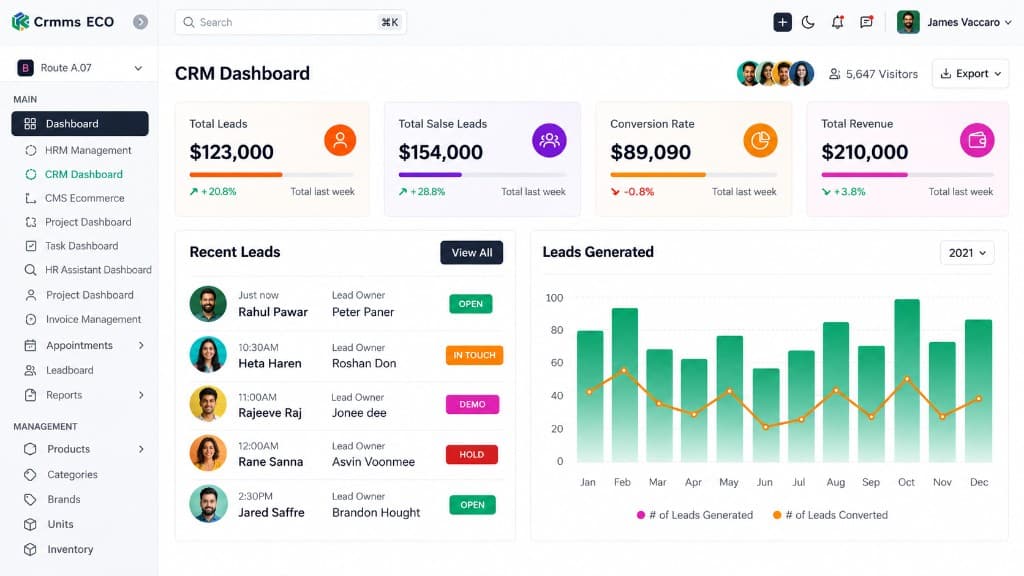
OmniSight — B2B SaaS & Design System
Enterprise cloud dashboard design with dense data tables, multi-parameter filtering, customizable widgets, and Figma Dev Mode handoff.
- Dense data tables with bulk actions, sorting, and sticky freeze columns
- Custom query filter builder with saved view preset drawers
- Atomic component library with component properties (Boolean, Text, Swap)
- Figma Dev Mode ready design specifications with token documentation
Build an Enterprise Design System & Multi-Platform Product
Take everything you learned and create a complete design ecosystem from: User Research → IA → Wireframes → Design System → High-Fidelity UI → Interactive Prototype → Dev Handoff.
YOUR FINAL PORTFOLIO CAN INCLUDE:
What You Get Beyond Technical Training
We Don't Stop at the Last Class.
Mastering design tools is only one part of landing product design roles. Your career preparation includes:
01 — Resume Preparation
01 — Resume Preparation
Craft a designer-focused resume highlighting your product thinking, methodologies, and case studies.
Why AIDEAS Academy?
Learn. Design. Prototype. Get Career Support.
Designed from the ground up for career switchers, fresh graduates, and ambitious engineers seeking practical, production-grade technical skills.
Industry-Oriented Curriculum
Learn modern product design frameworks, Figma workflows, and design system architectures.
Hands-On Learning
Apply concepts by designing production screens and flows instead of only watching theory slides.
Live + Recorded Learning
Attend live mentor-led sessions with lifetime access to recorded classes for continuous revision.
Beginner-Friendly Approach
Start from basic visual principles, color theory, and Gestalt laws before advancing to complex flows.
Real-World Projects
Build portfolio-worthy case studies tailored to what product managers and design directors expect.
Career Preparation
Resume guidance, Behance curation, mock interview critiques, and placement assistance.
Expert Guidance
Learn with seasoned design architects and product specialists focused on practical industry skills.
A Complete UI/UX & Product Designer Stack
Work with industry-standard design tools, prototyping engines, user research frameworks and AI protocols.
DESIGN & FIGMA
UX RESEARCH
WIREFRAMING & PROTOTYPES
DESIGN SYSTEMS
TESTING & HANDOFF
AI IN DESIGN
What Can You Do After Learning UI/UX Design?
Explore Multiple Product Design Career Paths
Your UI/UX Design skills can prepare you for roles such as:
The actual role and compensation you qualify for will depend on your design skills, portfolio quality, experience, interview performance and the employer.
Is This Course Right For You?
You Can Start Even If You Are Starting From Zero.
This Program Is Suitable For:
- ✓Fresh Graduates
- ✓Engineering & Design Students
- ✓Non-IT Graduates
- ✓Graphic & Visual Designers transitioning to UI/UX
- ✓Frontend Developers wanting UX skills
- ✓Working Professionals
- ✓Career Switchers
- ✓Anyone with a passion for creative digital products
You Don't Need:
- ✕Coding or Technical Programming Knowledge
- ✕Fine Arts or Sketching Background
- ✕Previous Professional Design Experience
You Do Need:
- ✓A willingness to learn & iterate
- ✓Attention to visual detail & user empathy
- ✓A laptop/computer with browser access
- ✓Consistent design practice
Your UI/UX Design Career Roadmap
Progress from fundamentals to production code and verified interview readiness.
Zero to Job-Ready UI/UX & Product Designer
Continuous 9-stage roadmap spanning design foundations, research, Figma, systems, prototyping, and career launch.
Learn Design Foundations
Visual hierarchy + Gestalt principles + Color theory.
Master UX Research
User personas + Journey mapping + Empathy maps.
Information Architecture
Card sorting + User flows + Structural blueprints.
Wireframing to High-Fi
Low-fi sketches + FigJam + High-fidelity layouts.
Master Figma & Auto Layout
Component architecture + Variants + Tokens.
Interactive Prototyping
Smart Animate + Micro-interactions + Motion curves.
Usability Testing & Validate
Task validation + Feedback loops + Metric iteration.
Build 3 Case Studies
Resume + Behance + Whiteboard Challenges + Mock Interviews.
Start Applying for Product Design Roles
Connect with hiring partners & design studios.
Qualify for In-Demand Developer Opportunities
Connect with our network of 150+ hiring partners across Hyderabad & PAN India, participate in technical mock interviews, and graduate with a verified live project portfolio.
AIDEAS Academy By The Numbers
See What Our Students Say
Real Students. Real Learning Experiences.
Arjun Mehta
UI/UX Design • Batch 2024
“I shifted from graphic design to product design. The Figma and design-system modules are very detailed. I built a complete delivery-app case study which impressed my interviewers.”
Priya Sharma
Deloitte“The combination of user research, Figma, and design systems in this course is perfect for product design roles. I use the workflows I learned here every single day at my job.”
“Prototyping coverage was excellent. I learned how to build interactive flows, Smart Animate, and usability tests. The mock interviews helped me refine my case-study answers.”
Vishal Singh
UX Designer @ Zoho
“I had zero design knowledge. They started with visual hierarchy and color theory and took us to Figma systems. The mentorship and critiques were very helpful.”
Neha Patel
UI Designer • IBM
Arjun Mehta
UI/UX Design • Batch 2024
“I shifted from graphic design to product design. The Figma and design-system modules are very detailed. I built a complete delivery-app case study which impressed my interviewers.”
Priya Sharma
Deloitte“The combination of user research, Figma, and design systems in this course is perfect for product design roles. I use the workflows I learned here every single day at my job.”
“Prototyping coverage was excellent. I learned how to build interactive flows, Smart Animate, and usability tests. The mock interviews helped me refine my case-study answers.”
Vishal Singh
UX Designer @ Zoho
“I had zero design knowledge. They started with visual hierarchy and color theory and took us to Figma systems. The mentorship and critiques were very helpful.”
Neha Patel
UI Designer • IBM
“Coming from a Civil Engineering background, I was intimidated by design tools. The hands-on Figma assignments and daily doubt support at AIDEAS made product thinking intuitive.”
Ravi Kumar
Product Designer @ TCS
“The design-system and Dev Mode handoff module is a game-changer. Interviewers were surprised that I knew about tokens, variants, and developer specs at a fresher level.”
Sneha Reddy
UI/UX Designer • Infosys
Sai Krishna
UI/UX Career Track • Batch 2024
“Placement support is 100% genuine. They helped me with my resume, conducted 5 mock interviews, and referred me directly. I had multiple offers in hand.”
Ananya Gupta
HCL Tech“The project-based learning is what sets them apart. We built real case studies and an enterprise design system, not just pretty screens. That portfolio alone got me shortlisted everywhere.”
“Coming from a Civil Engineering background, I was intimidated by design tools. The hands-on Figma assignments and daily doubt support at AIDEAS made product thinking intuitive.”
Ravi Kumar
Product Designer @ TCS
“The design-system and Dev Mode handoff module is a game-changer. Interviewers were surprised that I knew about tokens, variants, and developer specs at a fresher level.”
Sneha Reddy
UI/UX Designer • Infosys
Sai Krishna
UI/UX Career Track • Batch 2024
“Placement support is 100% genuine. They helped me with my resume, conducted 5 mock interviews, and referred me directly. I had multiple offers in hand.”
Ananya Gupta
HCL Tech“The project-based learning is what sets them apart. We built real case studies and an enterprise design system, not just pretty screens. That portfolio alone got me shortlisted everywhere.”
What Makes Our UI/UX Design Program Different?
Most Courses Teach Technologies. We Focus on the Complete Journey.
Learn
Understand the concepts from the foundation.
Practice
Solve coding problems and work through guided exercises.
Build
Create real applications using the technologies you learn.
Deploy
Learn how applications are prepared and deployed.
Prepare
Build your resume, GitHub profile and interview skills.
Apply
Get career guidance and placement assistance.
Attend a Live UI/UX Design Demo Session
Experience our mentor-led teaching style firsthand.
Don't decide based on a brochure.
Attend a Free Demo Session.
In the demo, discover:
No obligation. Speak with a course counsellor and understand the program first.
Frequently Asked Questions
Everything you need to know about the curriculum, eligibility, portfolio projects, and admissions.
No coding experience is required. UI/UX design focuses on user research, wireframing, visual design, and interactive prototyping using Figma. We teach all tools and workflows from absolute scratch.
Yes. Our step-by-step curriculum is designed specifically for freshers, non-IT graduates, and career transitioners who want to build a high-demand creative career in tech.
You will master Figma, FigJam, Auto Layout 5.0, Component Sets, Variables, Design Systems, Adobe XD basics, Usability Testing frameworks, and AI design tools like ChatGPT, Midjourney, and Relume.
Yes. You will complete 3 industry-grade portfolio case studies (CRM Sales Platform, Fintech Trading App, SaaS Analytics Dashboard) plus an Enterprise Design System capstone project that you can showcase on Behance and Figma.
You will learn how to leverage generative AI for user persona synthesis, UX copywriting, automated wireframing, and design research to work 3x faster like modern product design teams.
The course includes live interactive mentor-led classes along with complete session recordings for lifetime revision and self-paced practice.
We offer complete career assistance including portfolio reviews, design resume optimization, Behance/Dribbble profile setup, 1:1 mock design interviews, whiteboard challenge prep, and interview referrals.
Yes. We offer flexible weekend and evening batches tailored for working professionals looking to transition smoothly into UI/UX design roles.
You will receive an industry-recognized AIDEAS Academy Certificate in Professional UI/UX & Product Design with verified credentials to share on LinkedIn.
Your Next Step Is Simple
Don't Spend Months Watching Random YouTube Tutorials.
Design Thinking → User Research → Wireframing → Figma Mastery → Design Systems → High-Fi UI → Prototyping → Interview Preparation
Start Your UI/UX Product Design Journey With AIDEAS Academy
Learn the craft. Build the portfolio. Prepare for the opportunities.