DATA ANALYST
TRAINING & PLACEMENTS
Become a Job-Ready Data Analyst
Build real dashboards and reports, create a strong analytics portfolio, prepare for technical interviews, and get career & placement assistance from AIDEAS Academy.

Our Alumini Work At




















Why Learn Data Analytics in 2026?
Don't Learn Just Tools. Learn How to Turn Data Into Decisions.
Knowing Excel formulas is only the beginning.
Businesses need analysts who can take raw data from spreadsheets and databases to clear dashboards and confident business decisions.
Our Data Analyst program takes you from data fundamentals to building and publishing interactive reports that stakeholders actually use.
Spreadsheet Modeling + SQL Aggregations + Power BI & DAX + Interactive Business Dashboards.
Complete Analytics Toolkit

Excel
Clean, analyse and summarise data with formulas, PivotTables and charts.

SQL
Query, join and aggregate business data with confidence.

Power BI
Build interactive reports and dashboards for decision-makers.

DAX
Write measures, calculated columns and time-intelligence logic.

Power Query
Clean, merge and reshape data before it reaches your reports.

Python
Automate analysis workflows and handle data with Python scripts.

Git & GitHub
Track and share your analysis projects the way professional teams do.

Generative AI
Use large language models to speed up analysis and explore AI agents.
Want to See the Complete Roadmap?
Get the Data Analyst Syllabus
The Data Analyst Curriculum
- Introduction to Software & Applications
- SDLC Models (Waterfall, Agile, DevOps)
- Requirement Gathering & Documentation Basics
- Testing, Deployment & Maintenance Overview
- Real-World SDLC Case Studies
- Types of Data (Structured, Semi-Structured, Unstructured)
- Data Collection & Storage Basics
- Data Quality, Cleaning & Validation Concepts
- Introduction to Databases & Data Warehouses
- Fundamentals of Computing Systems
- Client-Server Architecture
- Cloud Computing Concepts (IaaS, PaaS, SaaS)
- Public, Private & Hybrid Cloud Models
- Cloud Use Cases in Modern Businesses
- Power BI Ecosystem Overview
- Power BI Desktop vs Service
- Connecting to Data Sources
- Understanding Data Fields & Visuals
- Creating Charts, Tables & Cards
- Formatting & Layout Best Practices
- Filters, Slicers & Drill-Through
- Cross-Filtering & Visual Interactions
- Creating Hierarchies
- Grouping Data for Analysis
- Date & Time Hierarchies
- Data Cleaning & Transformation
- Removing Duplicates & Errors
- Merging & Appending Queries
- Publishing Reports
- Dashboards & Sharing
- Workspace Management
- DAX Fundamentals
- Calculated Columns & Measures
- Common DAX Functions
- Advanced Visualization Techniques
- Custom Visuals & Themes
- Performance Optimization
- Complex Data Transformations
- M Language Basics
- Handling Large Datasets
- Dataflows & Gateways
- Scheduled Refresh & Automation
- Collaboration & Governance
- Complex Measures
- Time Intelligence Functions
- Star & Snowflake Schema
- Row-Level Security (RLS)
- Optimizing DAX Performance
- Best Practices
- Power BI Admin Portal
- Report Server Overview
- Licensing & Capacity Planning
- End-to-End Industry Project
- Deployment & Presentation
- Interview & Resume Guidance
- Excel Interface & Functions
- Data Entry & Formatting
- Sorting & Filtering
- Charts & Dashboards
- Conditional Formatting
- Data Validation
- PivotTables & PivotCharts
- Removing Duplicates
- Text & Date Functions
- Lookup Functions (XLOOKUP, INDEX-MATCH)
- Logical & Statistical Functions
- Power Query & Power Pivot
- Macros & VBA Basics
- Advanced Dashboards
- Sharing & Collaboration
- Database Concepts
- SELECT, WHERE, ORDER BY
- Aggregate Functions
- Joins & Relationships
- Subqueries
- Views
- CTEs & Window Functions
- Data Updates & Transactions
- Query Performance Tuning
- Indexes & Execution Plans
- Analytical Queries
- Business Reporting Use Cases
- Real-World SQL Scenarios
- Python Basics & Syntax
- Data Types & Control Structures
- Functions & Modules
- Collections & Iterators
- Error Handling
- File & Data Operations
- Web Framework Basics
- APIs & Data Integration
- Automation Scripts
- GUI Basics
- Git & GitHub
- Generative AI Concepts & Models
- Text, Image & Code Generation
- Prompt Design Techniques
- Few-Shot & Chain-of-Thought Prompting
- Prompt Optimization
- Transformer Architecture
- Popular LLMs (GPT, Claude, Gemini)
- Fine-Tuning Concepts
- Agent Architecture
- Tools, Memory & Planning
- Multi-Agent Systems
- Agent Frameworks
- Integration with APIs & Tools
- Real-World AI Agent Projects
Don't Just Watch Classes. Build Applications.
Build Projects That You Can Actually Show in an Interview.
Your portfolio should demonstrate what you can build — not just what you studied.
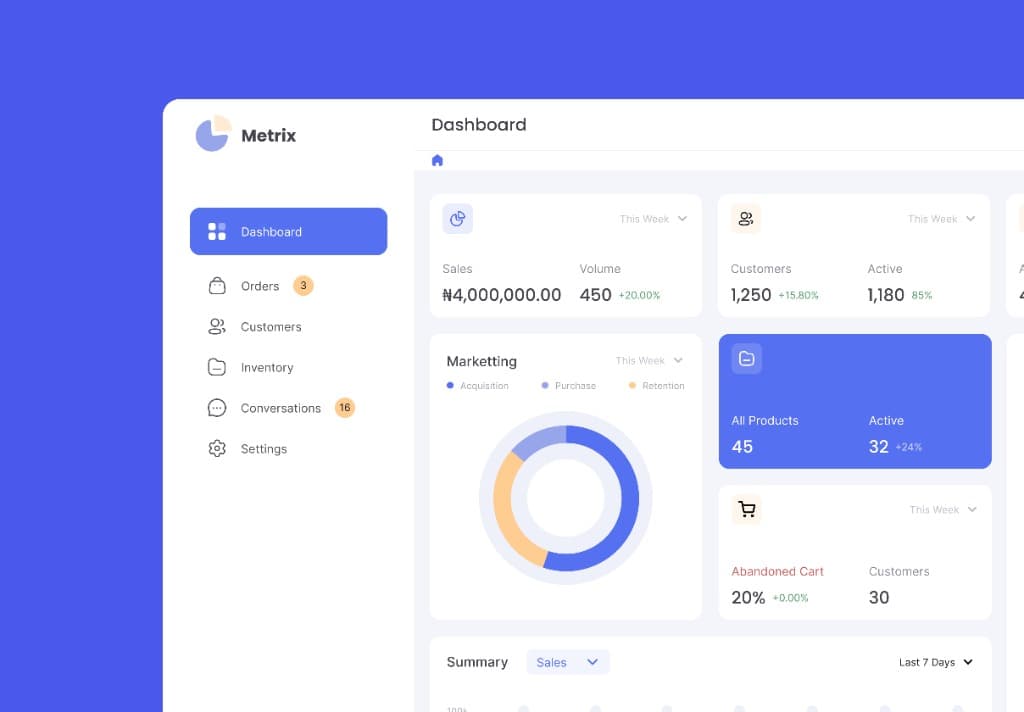
Sales Performance Dashboard
Build an interactive sales dashboard that tracks revenue, targets and regional performance.
- Revenue, target and growth KPI cards
- Star-schema data model with DAX measures
- Slicers, drill-through and cross-filtering
- Refresh-ready report layout for stakeholders
Retail Business Reporting in Power BI
Turn raw transaction data into a published report with cleaned data, a clean model and scheduled refresh.
- Data cleaning and merging with Power Query
- Time-intelligence measures written in DAX
- Row-level security for regional managers
- Published workspace report with scheduled refresh
Customer Segmentation Analysis
Analyse customer purchase behaviour with SQL and Excel to find high-value and at-risk customer groups.
- Recency and frequency segmentation using SQL window functions
- PivotTable summaries for retention and cohort trends
- Python scripts for data cleaning and repeatable runs
- Executive summary with business recommendations
Build Your Own Production-Style Business Intelligence Application
Take everything you learned and build a complete analytics project from: Requirement → Data → Cleaning → SQL → Data Model → Dashboard → Insights → Publishing
YOUR FINAL PORTFOLIO CAN INCLUDE:
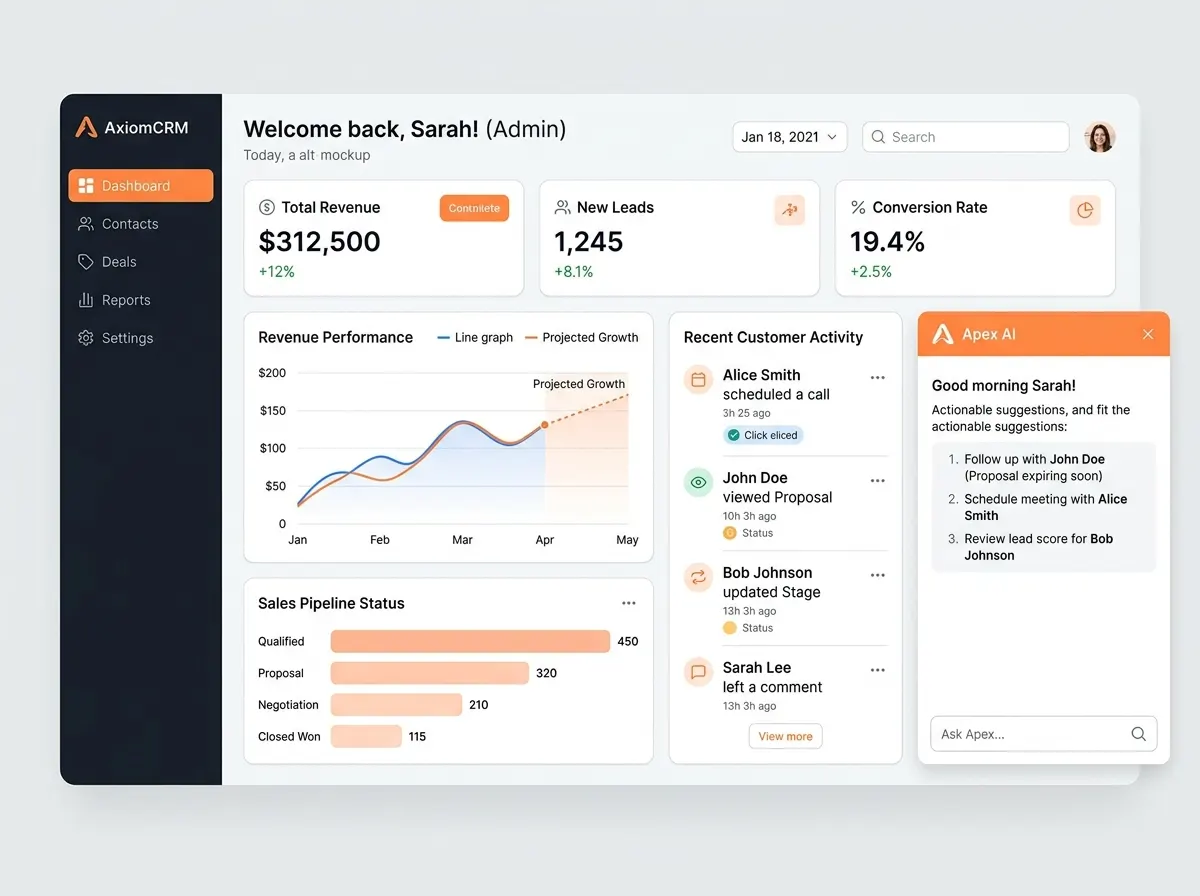
What You Get Beyond Technical Training
We Don't Stop at the Last Class.
Learning to analyse data is only one part of becoming interview-ready. Your career preparation includes:
01 — Resume Preparation
01 — Resume Preparation
Create an analytics-focused resume highlighting your technical skills and dashboards.
Why AIDEAS Academy?
Learn. Build. Prepare. Get Career Support.
Designed from the ground up for career switchers, fresh graduates, and ambitious analysts seeking practical, production-grade business intelligence skills.
Industry-Oriented Curriculum
Learn technologies and workflows used in modern business intelligence and data analytics.
Hands-On Learning
Apply concepts by building interactive dashboards and models instead of only watching demonstrations.
Live + Recorded Learning
Attend live sessions and use recordings for revision whenever you need them.
Beginner-Friendly Approach
Start from spreadsheet fundamentals and progress toward advanced SQL, DAX, and automated analytics.
Real-World Projects
Build portfolio-oriented dashboards based on practical business and retail reporting scenarios.
Career Preparation
Resume guidance, mock interviews, technical preparation and placement assistance.
Expert Guidance
Learn with trainers and mentors focused on practical business analytics skills.
A Complete Data Analyst Stack
Work with the spreadsheet, database, business intelligence, scripting and AI tools covered in this course.
SPREADSHEETS
DATABASE
BUSINESS INTELLIGENCE
PROGRAMMING
AI & AGENTS
DATA FUNDAMENTALS & CLOUD
What Can You Do After Learning Data Analytics?
Explore Multiple Analytics Career Paths
Your Data Analyst skills can prepare you for roles such as:
The actual role and compensation you qualify for will depend on your skills, projects, experience, interview performance and the employer.
Is This Course Right For You?
You Can Start Even If You Are Starting From Zero.
Suitable For
You Don't Need
You Do Need
Your Data Analyst Career Roadmap
Progress from Excel and SQL to Power BI, DAX, automation, and verified interview readiness.
Zero to Job-Ready Data Analyst
Continuous 9-stage roadmap spanning Excel, SQL, Power BI, DAX, Python automation, and career launch.
Learn Data Fundamentals
Understand structured & unstructured data, data hygiene, warehouse concepts, and SDLC models.
Master Excel
VLOOKUP, XLOOKUP, INDEX/MATCH, PivotCharts, conditional formatting, and business financial modeling.
Learn SQL
Relational database querying, multi-table JOINs, subqueries, CTEs, and window functions.
Build Power BI Reports
Connect data sources, create custom visuals, drill-through filters, and design executive dashboards.
Master DAX & Data Modeling
Star-schema architecture, CALCULATE, time-intelligence functions, and row-level security filters.
Automate With Python
Python data scripts, pandas manipulation, file transformation, and scheduled automation pipelines.
Publish & Share Dashboards
Cloud workspace governance, automated gateway refresh, scheduled alerts, and stakeholder sharing.
Prepare for Interviews
Technical SQL/DAX scenarios, dashboard presentation walkthroughs, and 1-on-1 interview simulations.
Start Applying for Analyst Opportunities
Active referral distribution across hiring partners in Hyderabad & PAN India, and continuous placement support.
Qualify for In-Demand Analytics Opportunities
Connect with our network of 150+ hiring partners across Hyderabad & PAN India, participate in technical mock interviews, and graduate with a verified live project portfolio.
AIDEAS Academy By The Numbers
See What Our Students Say
Real Students. Real Learning Experiences.
“The DAX modeling and real client reporting exercises made all the difference in clearing my Deloitte technical rounds.”
“I switched from a non-IT background. Starting with spreadsheets and progressing to SQL joins and interactive dashboards was seamless.”
“The capstone project alone gave me 20 minutes of solid conversation in my final round. 100% practical curriculum.”
“The DAX modeling and real client reporting exercises made all the difference in clearing my Deloitte technical rounds.”
“I switched from a non-IT background. Starting with spreadsheets and progressing to SQL joins and interactive dashboards was seamless.”
“The capstone project alone gave me 20 minutes of solid conversation in my final round. 100% practical curriculum.”
“Hands-on Power Query transformation and automated refresh workflows matched exact requirements on the job.”
“The mock technical interviews prepared me for every tricky window function and data model question.”
“AIDEAS mentors helped me structure my resume and highlight my Excel and SQL projects with precision.”
“Hands-on Power Query transformation and automated refresh workflows matched exact requirements on the job.”
“The mock technical interviews prepared me for every tricky window function and data model question.”
“AIDEAS mentors helped me structure my resume and highlight my Excel and SQL projects with precision.”
“As a fresh graduate, having live Power BI reports hosted and accessible from my portfolio gave me huge confidence.”
“Row-level security and time-intelligence DAX are taught in thorough detail. Cracked the interview on my first attempt.”
“The combination of business problem solving, Excel dashboards, and SQL queries gives you complete edge.”
“As a fresh graduate, having live Power BI reports hosted and accessible from my portfolio gave me huge confidence.”
“Row-level security and time-intelligence DAX are taught in thorough detail. Cracked the interview on my first attempt.”
“The combination of business problem solving, Excel dashboards, and SQL queries gives you complete edge.”
“The curriculum goes far beyond superficial tool tutorials. You learn how real business analytics teams operate.”
“From spreadsheet lookups to executive dashboard presentations, the progression is structured and industry-grade.”
“The 1:1 mentorship sessions clarified every doubt I had about star-schema relationships and dataflows.”
“The curriculum goes far beyond superficial tool tutorials. You learn how real business analytics teams operate.”
“From spreadsheet lookups to executive dashboard presentations, the progression is structured and industry-grade.”
“The 1:1 mentorship sessions clarified every doubt I had about star-schema relationships and dataflows.”
“Learned how to turn messy raw transaction data into clean, executive financial statements and KPIs.”
“The retail business reporting case study was directly relevant to the interview case round at Flipkart.”
“Python automation for spreadsheets saved our team hours. Grateful to the AIDEAS faculty for constant encouragement.”
“Learned how to turn messy raw transaction data into clean, executive financial statements and KPIs.”
“The retail business reporting case study was directly relevant to the interview case round at Flipkart.”
“Python automation for spreadsheets saved our team hours. Grateful to the AIDEAS faculty for constant encouragement.”
What Makes Our Data Analyst Program Different?
Most Courses Teach Tools. We Focus on the Complete Journey.
Learn
Understand the concepts from the foundation.
Practice
Work through datasets and guided exercises in Excel and SQL.
Build
Create real dashboards and reports using the tools you learn.
Deploy
Learn how reports are published, shared and refreshed.
Prepare
Build your resume, GitHub profile and interview skills.
Apply
Get career guidance and placement assistance.
FREE DATA ANALYST DEMO CLASS
Not Sure If Data Analytics Is Right for You?
Don't decide based on a brochure.
Attend a Free Demo Session.
In the demo, discover:
Frequently Asked Questions
Everything you need to know about the curriculum, eligibility, projects, and admissions.
Your Next Step Is Simple
Don't Spend Months Learning Random Tutorials.
Excel → SQL → Power Query → DAX → Power BI → Python → Projects → Interview Preparation
Start Your Data Analyst Journey With AIDEAS Academy
Learn the skills. Build the projects. Prepare for the opportunities.